1. Use the "Conversor de Marcadores" to convert a CSV file into a CSV file
Open the free Conversor de Marcadores, select "CSV" and set "convert" to "CSV for Google Sheets". Generate and download the file. Se tiveres problemas a converter o ficheiro, podes contactar o suporte gratuito.
Ensure that the CSV file contains columns labelled "Timecode In", "Name" and "Comment". Otherwise, it will not work. You can also add columns for 'Colour' and 'Timecode Out'.
2. Import the CSV file into Google Sheets
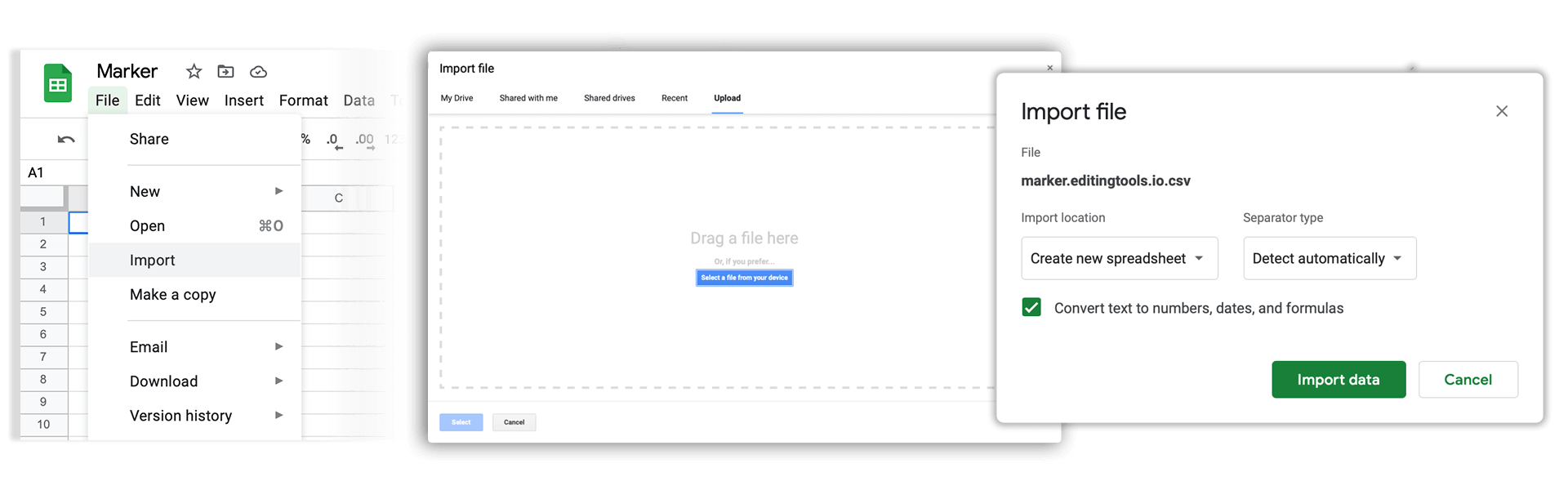
Open Google Sheets and go to "File -> Import". Upload the generated CSV file and press "Import Data" to generate the Sheet with all markers.
🚀 Concluído
Por agora, é tudo! Se este tutorial te foi útil, partilha-o para nos apoiares. Se tiveres sugestões sobre como poderíamos melhorar o workflow, diz-nos!