1. Export a CSV marker file from Pix
Open the comments panel on the right side in Pix. Press the three dots and select "Export". Now you can then download the CSV file from Pix.
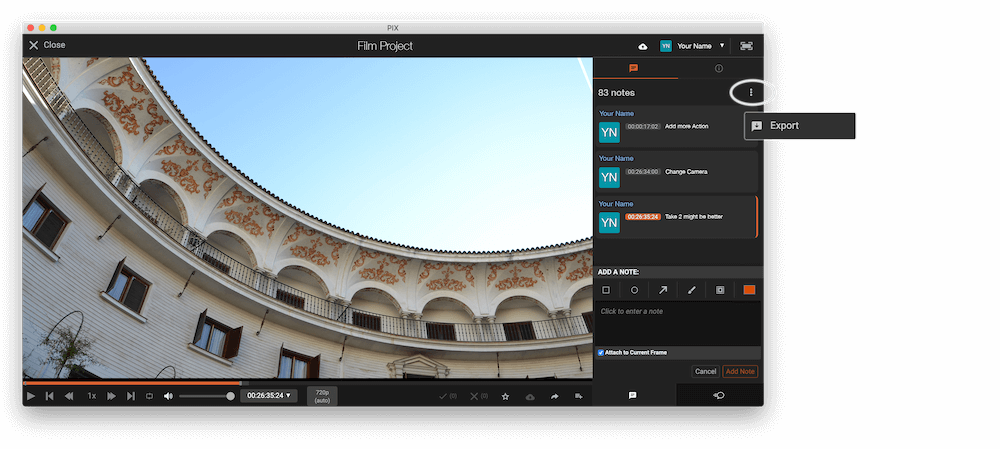
The timecode in Pix starts with 00:00:00:00 for each clip, so you may need to use the offset function on EditingTools.io to sync it with you timeline or move it manually in your NLE (editing software).
2. Use the "Conversor de Marcadores" to convert the CSV marker file into a SRT subtitle file
Open the free Conversor de Marcadores, select "Pix Systems > Comments (.csv)" and set "convert" to "SRT". Generate and download the file. Se tiveres problemas a converter o ficheiro, podes contactar o suporte gratuito.
3. Import the SRT subtitle file into DaVinci Resolve
To import subtitles go to "Files -> Import -> Subtitle...". Select the subtitle file and import. You can now drag and drop the subtitle file from the Media Pool into your timeline.
🚀 Concluído
Por agora, é tudo! Se este tutorial te foi útil, partilha-o para nos apoiares. Se tiveres sugestões sobre como poderíamos melhorar o workflow, diz-nos!